
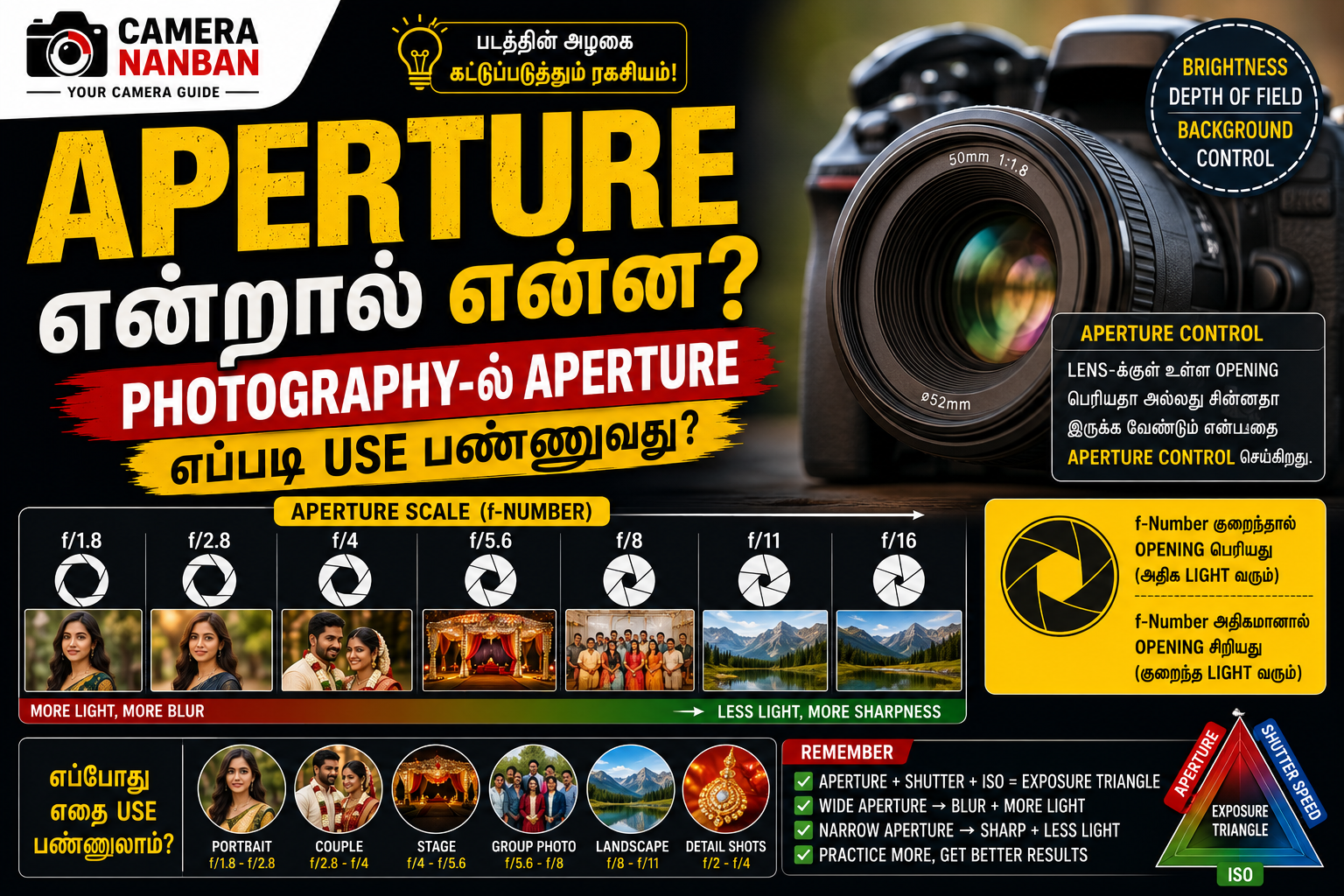
Photography கற்றுக்கொள்ள ஆரம்பிக்கும்போது அதிகமாக கேட்கும் முக்கியமான மூன்று settings Aperture, Shutter Speed, ISO. இந்த மூன்றையும் சேர்த்து Exposure Triangle என்று சொல்வார்கள்.
இதில் Aperture என்பது lens-க்குள் எவ்வளவு light camera sensor-க்கு செல்ல வேண்டும் என்பதை control செய்யும் முக்கிய setting.
Simple-ஆ சொன்னா:
Aperture பெரியதாக இருந்தால் அதிக light வரும்.
Aperture சிறியதாக இருந்தால் குறைந்த light வரும்.
ஆனால் இதோடு background blur மற்றும் depth of field-யும் Aperture control செய்யும்.
Aperture என்றால் என்ன?
Camera lens-க்குள் ஒரு opening இருக்கும். அந்த opening பெரியதா அல்லது சின்னதா இருக்க வேண்டும் என்பதை Aperture setting control செய்கிறது.
Aperture values பொதுவாக இப்படி இருக்கும்:
- f/1.4
- f/1.8
- f/2.8
- f/4
- f/5.6
- f/8
- f/11
- f/16
இங்க ஒரு important point:
f-number குறைந்தால் opening பெரியது.
f-number அதிகமானால் opening சிறியது.
அதாவது:
f/1.8 = பெரிய opening
f/8 = சிறிய opening
இந்த concept beginners-க்கு ஆரம்பத்தில் கொஞ்சம் confusing ஆக இருக்கலாம்.
f/1.8 எப்போது Use பண்ணலாம்?
f/1.8 மாதிரி wide aperture அதிக light sensor-க்கு அனுமதிக்கும்.
இதனால் low-light-ல் கூட ISO அதிகமாக increase பண்ணாமல் photo எடுக்க முடியும்.
Portrait Photography-க்கு f/1.8 மிகவும் popular.
இதன் advantages:
- நல்ல background blur
- Subject separation
- Low-light advantage
- Attractive portraits
50mm f/1.8 lens இதற்காகவே பல photographers use பண்ணுவார்கள்.
f/4 முதல் f/5.6 எப்போது?
f/4 முதல் f/5.6 வரை wedding stage, couple portraits, small group photos மற்றும் general photography-க்கு useful.
இந்த range-ல்:
- Subject focus நல்லா இருக்கும்
- Background முழுக்க blur ஆகாது
- Light-ம் reasonably கிடைக்கும்
Event photography-க்கு இது practical range.
f/8 எப்போது Use பண்ணலாம்?
f/8 பொதுவாக group photos, landscape மற்றும் அதிக depth of field தேவைப்படும் situations-க்கு useful.
Group photo எடுக்கும்போது எல்லாரும் focus-ல் வரணும்.
அதனால் f/1.8 மாதிரி very wide aperture use பண்ணினா front row sharp-ஆ இருந்து back row blur ஆகலாம்.
f/5.6 முதல் f/8 வரை group size-ஐ பொறுத்து use பண்ணலாம்.
Aperture மற்றும் Background Blur
Background blur-க்கு Aperture பெரிய role play செய்கிறது.
Example:
f/1.8 → அதிக background blur
f/2.8 → நல்ல blur
f/4 → moderate blur
f/8 → background detail அதிகம்
ஆனால் blur Aperture மட்டும் depend ஆகாது.
இதையும் depend பண்ணும்:
- Lens focal length
- Subject distance
- Background distance
- Sensor size
Example:
50mm f/1.8 lens-ல் subject background-இலிருந்து தூரமாக இருந்தால் blur இன்னும் அதிகமாக கிடைக்கும்.
Aperture மற்றும் Light
Wide aperture அதிக light அனுமதிக்கும்.
Example:
f/1.8 → அதிக light
f/4 → medium light
f/8 → குறைந்த light
Low-light wedding hall-ல் f/1.8 அல்லது f/2.8 use பண்ணினால் shutter speed safe-ஆ வைத்துக்கொள்ள easy ஆகும்.
f/8 use பண்ணினால் light குறைவதால் ISO increase அல்லது shutter speed slow பண்ண வேண்டியிருக்கும்.
Wedding Photography-ல் Aperture எப்படி வைக்கலாம்?
Wedding photography-ல் எல்லா photo-க்கும் ஒரே aperture use பண்ண முடியாது.
Bride / Groom Portrait
f/1.8 – f/2.8
Background blur மற்றும் subject separation-க்கு useful.
Couple Portrait
f/2.8 – f/4
இருவருடைய face-மும் focus-ல் இருக்க safer.
Stage Photography
f/4 – f/5.6
Bride, Groom மற்றும் decorations reasonably sharp-ஆ கிடைக்கும்.
Group Photo
f/5.6 – f/8
பல பேர் ஒரே frame-ல் இருந்தால் depth of field அதிகமாக இருக்க வேண்டும்.
Detail Shots
Ring, jewellery, flower, invitation போன்ற close-up shots-க்கு:
f/2 – f/4
use பண்ணலாம்.
Flash Use பண்ணும்போது Aperture எப்படி வைக்கலாம்?
Flash photography-ல் Aperture subject-க்கு வரும் flash exposure-ஐ அதிகமாக affect பண்ணும்.
Indoor wedding hall-ல் ஒரு practical starting point:
- Aperture – f/2.8 முதல் f/4
- Shutter – 1/160 முதல் 1/200 sec
- ISO – 400 முதல் 800
- Flash – தேவைக்கேற்ப adjust
Group photo + flash எடுத்தால்:
- Aperture – f/5.6
- ISO – 400 முதல் 800
- Shutter – 1/160 sec
ஒரு நல்ல starting point ஆக இருக்கும்.
Exact settings venue lighting, flash power மற்றும் subject distance-ஐ பொறுத்து change ஆகும்.
Aperture vs Shutter Speed
Aperture மற்றும் shutter speed ஒன்றுக்கொன்று related.
Aperture narrow பண்ணினால் light குறையும்.
Example:
f/2.8 → photo bright
f/8 → photo darker
f/8 use பண்ணும்போது brightness maintain செய்ய:
- shutter speed slow பண்ணலாம்
- அல்லது ISO increase பண்ணலாம்
Moving subject இருந்தால் shutter speed slow பண்ணுவது blur கொடுக்கலாம். அதனால் ISO increase பண்ணுவது better option ஆக இருக்கலாம்.
Aperture vs ISO
Wide aperture use பண்ணினால் அதிக light கிடைக்கும்.
இதனால் ISO குறைவாக வைத்துக்கொள்ள முடியும்.
Example:
f/1.8 + ISO 400
same lighting-ல்
f/5.6 use பண்ணினால் ISO 1600 அல்லது அதற்கு மேல் தேவைப்படலாம்.
அதனால் fast aperture lens low-light photography-க்கு useful.
Depth of Field என்றால் என்ன?
Depth of Field என்பது photo-வில் எவ்வளவு area sharp focus-ல் இருக்கும் என்பதைக் குறிக்கும்.
Shallow Depth of Field
f/1.8 அல்லது f/2.8
Subject மட்டும் sharp, background blur.
Portraits-க்கு suitable.
Deep Depth of Field
f/8 அல்லது f/11
Foreground முதல் background வரை அதிக area sharp.
Landscape மற்றும் group photography-க்கு suitable.
Beginner-கள் செய்யும் Common Mistakes
எல்லா photo-வும் f/1.8-ல் எடுப்பது
Background blur அழகா இருக்கும் என்பதற்காக எல்லா situation-லும் f/1.8 use பண்ணக்கூடாது.
Group photos-ல் சில faces blur ஆகலாம்.
Aperture மட்டும் பார்த்து Exposure Fix பண்ணுவது
Aperture change பண்ணும்போது shutter speed மற்றும் ISO-வும் check பண்ண வேண்டும்.
Lens Maximum Aperture தெரியாமல் இருப்பது
ஒவ்வொரு lens-க்கும் maximum aperture வேறுபடும்.
Example:
50mm f/1.8 lens → f/1.8 வரை open ஆகும்.
18-55mm kit lens → zoom position-ஐ பொறுத்து maximum aperture மாறலாம்.
Best Aperture எது?
ஒரே ஒரு best aperture கிடையாது.
Usage-ஐ பொறுத்து aperture choose பண்ண வேண்டும்.
Simple guide:
Portrait → f/1.8 – f/2.8
Couple → f/2.8 – f/4
Stage → f/4 – f/5.6
Group → f/5.6 – f/8
Landscape → f/8 – f/11
இந்த values starting point மட்டும். Lens, distance மற்றும் lighting-ஐ பொறுத்து adjust பண்ண வேண்டும்.
Aperture Priority Mode என்றால் என்ன?
Nikon camera-வில் பொதுவாக A Mode, Canon camera-வில் Av Mode என்று இருக்கும்.
இந்த mode-ல் நீங்கள் Aperture choose பண்ணுவீர்கள். Camera shutter speed-ஐ automatically adjust செய்யும்.
Beginners Aperture effects கற்றுக்கொள்ள இந்த mode useful.
Portrait photography practice பண்ண:
- A / Av Mode
- f/2.8
- Auto ISO
வைத்து ஆரம்பிக்கலாம்.
Final Thoughts
Aperture என்பது photo brightness மட்டும் control செய்யும் setting இல்லை. Background blur, depth of field, low-light performance மற்றும் overall image look-ஐ control செய்யும் முக்கியமான photography setting.
Wide aperture portraits மற்றும் low-light-க்கு useful.
Narrow aperture group photos மற்றும் landscape-க்கு useful.
Aperture-ஐ Shutter Speed மற்றும் ISO உடன் balance பண்ணி use பண்ண கற்றுக்கொண்டால் photography quality மிகவும் improve ஆகும்.
Photography-ல் ஒரு single setting-ஐ memorize பண்ணுவதற்குப் பதிலாக, different lighting மற்றும் subjects-ல் practice பண்ணுவது தான் best.